Showing posts with label Hercules. Show all posts

Tuesday, December 27, 2022

Hercules DJ Control Mix 2-Deck DJ Controller For iOS & Android Devices (white)


Great value option for newcomers to DJing. Designed for iOS or Android devices, the DJ Control Mix connects wirelessly via Bluetooth. Ideal for beginners.

Supplier's Notes:
DJControl Mix is a wireless 2-deck DJ controller specially designed for use with iOS and Android smartphones. It connects to the user's iOS or Android smartphone via Bluetooth Low Energy and controls the djay app.

The controller's size (13.4 x 3.9 x 1.9" / 34 x 10 x 4.9 cm), weight (1.1 lb / 0.5 kg) and overall design are perfect for use with smartphones. It includes a stand for the user's smartphone and is powered via USB cable, either using a USB power adapter (not included) or a USB battery / power bank (not included).

DJControl Mix helps users learn how to mix: its ultra-low latency, precise controls (jog wheels and faders) and extensive set of features (pads, as well as volume and filter / bass control knobs) provide DJs with the same mixing possibilities as professional-grade DJ hardware.

DJs can play their mixes out loud on a Bluetooth speaker (not included) connected to their smartphone, using the smartphone's headphones output, or on their smartphone's built-in speaker.

Specifcations:

Product weight: 1.1 lb / 0.5 kg
Product dimensions (W x D x H): 13.4 x 3.9 x 1.9 inches / 34 x 10 x 4.9 cm
Product name: DJControl Mix
Colours: White, yellow, black
Connections for speakers and headphones: Bluetooth speaker(s) or headphones connected to smartphone
Built-in smartphone speaker
Wired speaker(s) connected to smartphone
Diameter of jog wheels: 2.2 inches / 5.5 cm (with touch detection)
Wireless connection to smartphone or tablet: Bluetooth Low Energy (ultra-low latency)
Included accessories: Foldable stand, USB power cable (USB-C to USB-A), splitter cable
Power supply: Via USB-C connector (USB-C to USB-A cable included)
Search keywords: Hercules DJ controller, Hercules mixer, smartphone mixer, Android mixer, iPhone mixer, beginner mixer, beginner DJ controller, beginner mixing controller, DJ smartphone, DJ tablet, DJ portable, DJ iPhone, DJControl Mix, Hercules Mix, Android DJ controller, DJ app for iPhone, DJ app for Android, DJ iPad
Included app: djay iOS / djay Android

Box contents:

DJControl Mix
USB power cable (USB-C to USB-A)
Foldable stand for smartphone (or tablet)
DJ splitter cable:
Connects to the headphones output on a smartphone or tablet, providing separate outputs for speakers and headphones
Quick start guide

  • Bluetooth wireless controller for Android and iPhone smartphones; also for Android tablets and iPad
  • Easily mix on your smartphone via Bluetooth Low Energy - connecting is simple and quick!
  • Controls the djay app available free of charge for Android and iOS
  • Foldable smartphone stand included
  • Monitor tracks: listen to your mix on headphones using the included splitter cable
  • Lets you access essential features for DJing (cue points, samples, effects, loops)
  • Jog wheels for mixing and scratching, plus faders, knobs and pads: mix like you would on a full-size DJ controller!
  • In the djay app, you can mix using tracks stored on your smartphone or from supported music streaming services (TIDAL and SoundCloud [iOS and Android], Beatport and Beatsource [iOS only]); music streaming service subscriptions are required
  • Enjoy mixing with 4 SoundCloud playlists including 20 great songs, free of charge and without having to log in

Hercules DJ Control Inpulse 200 DJ Controller With DJuced DJ Software


Beginner-friendly DJ controller from Hercules, designed to help you learn how to mix. Light guides give real-time feedback on how to beatmatch tracks. Bundled with DJuced software and DJ Academy video tutorials.

Supplier's notes:
Hercules introduces the first-ever range of DJ controllers to really learn how to mix. Train your ear and learn to master beatmatching manually with the DJControl Inpulse 200. Its easy-to-use design and comfort make it the perfect controller to get started with DJing. Controlled by DJUCED software, the DJControl Inpulse 200 offers new features to help you learn: light guides on the controller to learn the right moves, the Intelligent Music Assistant (IMA) to help you pick the best songs to play, the ENERGY feature to manage the party mood, and the DJ Academy with its onboard video tutorials. It's got everything you need to become a DJ.

LIGHT GUIDES:

Activate the Beatmatch Guide to learn how to mix. Deactivate it once you have mastered the moves. Follow the TEMPO arrows to adjust the BPM of each track. Synchronize your tracks using the BEAT ALIGN arrows.

DJ ACADEMY TUTORIALS:

Watch the comprehensive tutorial videos incorporated into DJUCED, to learn the fundamentals of DJing and improve your skills.

INTELLIGENT MUSIC ASSISTANT:

Activate the Intelligent Music Assistant (IMA) to get the best music suggestions.

TAKE CONTROL OF THE PARTY AMBIENCE:

Pace the atmosphere of your parties with the ENERGY function. From blue (calm) to red (energetic), choose the most appropriate track for your mix.

  • Integrated built-in audio interface
  • Master out for speakers: 2 RCA Headphones out: 1/8" stereo (3.5 mm)
  • 2 decks
  • Jog wheel: vinyl feeling with touch detection
  • 4 pads x 4 modes (hot-cue, roll, fx, sampler)
  • Loop in/loop out keys
  • Browser controls: Rotary encoder + 2 load keys + Assistant key
  • 1 filter, 2 EQ, 1 gain knob, 1 volume fader/deck
  • Crossfader, master volume, headphones
  • Tempo guide: light guide along the tempo fader
  • Beat Align guide: light guide below the wheel
  • Assistant: suggests tracks from your library
  • Energy: helps to host your parties - get people dancing with high-energy tracks, Slow things down with lower-energy tracks
  • Trending songs: display a list of the best upcoming songs to play, suggested by DJUCED Artificial Intelligence
    Weight (g)900
    Dimensions (mm)320 x 195 x 49
    System Requirements PCWindows 7, 8, 10, 4GB RAM & more
    System Requirements MacMacOS 10.11 & higher Core 2 Duo CPU & higher, 4GB RAM & more

Monday, December 23, 2019

Hercules DJ Control Starlight DJ Controller With Serato DJ Lite & DJuced DJ Software

Hercules DJ Control Starlight DJ Controller With Serato DJ Lite & DJuced DJ Software


Tiny DJ setup from the affordable but reliable Hercules brand. Simple stuff for beginners: a compact DJ controller and all the software you need to get started. Instant fun.

Supplier's notes:
Ultra-compact, ultra-light, ultra-practical and ultra-unique with its lights, the DJControl Starlight packs all the features needed to mix and scratch with Serato DJ Lite. With its built-in audio interface, the DJControl Starlight offers pre-listening in the headphones so you can then play your mix on speakers, which is perfect for learning or creating new mixes. The system is so comprehensive for its size that it boasts all the essential features such as bass equalization / filter knobs for smooth transitions or touch-sensitive jog wheels for easy scratching. The added bonus: the bright and powerful RGB backlighting with unique strobe effects to make it easier to learn how to mix.

SERATO DJ LITE:

The perfect DJ controller to introduce you to DJing, with Serato DJ Lite included

BACKLIGHTS:

Control the backlights on the base: RGB and strobe effects

AUDIO:

Built-in sound card to pre-listen to the headphones and speaker outputs

COMPACT:

Compact and easy to carry wherever you want

Built-in audio interface
Master out for speakers: 1/8" stereo (3.5 mm) Headphones out: 1/8" stereo (3.5 mm)
2 decks
Touch detection on jog wheel
Backlit Base
Visual information controlled by Serato DJ Lite
Put on a stunning show with the RGB strobe effect backlighting
4 pads x 4 modes (hot-cue, loop, fx, sampler)
Crossfader; master volume knob; headphones volume knob
1 bass EQ/filter knob per deck
1 deck volume knob per deck

Weight (g) 500
Dimensions (mm) 340 x 39 x 100
System Requirements PC Windows 7, 8, 10, 4 GB RAM & moreUSB 2.0 port, 1280x720 display, 5 GB HD space
System Requirements Mac MacOS 10.11 & higher - 3 1.07 GHz CPU & higher, 4 GB RAM & moreUSB 2.0 port, 1280x720 display, 5 GB HD space

Thursday, June 9, 2016

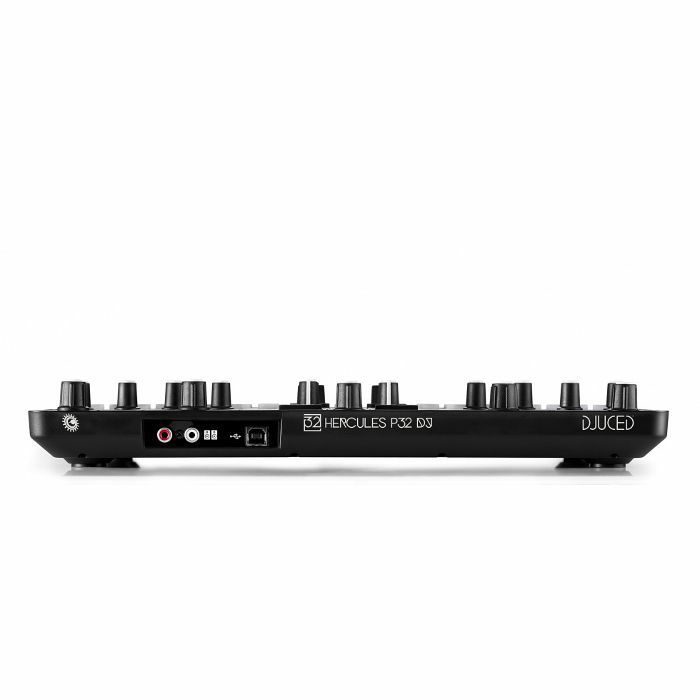
Hercules P32 DJ Controller With DJuced DJ Software


Hercules P32 DJ Controller With DJuced DJ Software

A unique, all-in-one controller at the crossroads of DJing and performance:
With 2 decks, screens displaying the sizes of loops, effects racks, equalizers and more, Hercules P32 DJ is perfectly designed for mixing.
Add in the two grids of 16 pads, sample packs integrated within DJUCEDTM 40-, the slip and quantize smart functions... and you have a package with all the advantages for performance.
No compromise - Hercules P32 DJ represents the optimization of 2 worlds of DJing in a single unique controller.

The thrill of instant creative mixing: Play. Remix. Perform:
The perfect combination of body and spirit.
Hercules P32 DJ features 32 ergonomic and responsive pads for precise performance and high-quality feel.
the intelligence of the DJUCEDTM 40- DJing software lets you keep the rhythm and the structure of tracks intact, no matter what you're doing.
All the features to mix and remix are at your fingertips.
Your only task: focus on the fun of creating.

Develop your onstage presence:
Being a DJ is much more than just technical skills and creating a playlist: it also involves your ability to put on a show.
Hercules P32 DJ lets you develop your signature sound, and your visual presentation.
The combination of pads, dynamic backlighting and sample packs helps you refine your identity as a DJ.

Included software:
DJuced 40-(PC / MAC )
Complete and intuitive professional DJing software included
OTHER COMPATIBLE SOFTWARE (NOT INCLUDED)
The Traktor mapping file is available for download on Hercules' website
The Hercules P32 DJ is also compatible with all DJing software open to MIDI mapping, such as
Virtual DJ, Cross DJ, DJAY, etc. (not included)

Ready for finger drumming:
Practice Finger Drumming with music production software such as: Ableton Live, Garage Band, Bitwig Studio, Melodics, etc.

Loop size display
Built-in audio
Two grids of 16 performance pads

Channels 2
Connection USB
Controls Platters, Pads, Buttons, Rotary Knobs, Faders
Outputs RCA, 1/4" jack (headphones)
System Requirements PC Windows 7 and higher (32 and 64-bit), 2 GB RAM or more, 2 GHz CPU or higher
System Requirements Mac Mac OS X 10.8 and higher(32 and 64-bit), 2 GB RAM or more, 2 GHz CPU or higher
Power Supply USB Bus Powered

Thursday, December 4, 2014

Hercules DJ Control Wave DJ two Deck iPad Controller w/ DJUCED DJ Software

Hercules DJ Control Wave DJ two Deck iPad Controller w/ DJUCED DJ Software


Control your iPad® wirelessly

Built-in Bluetooth® 3.0 wireless technology
Ultra-fast connection, with no wires between the controller and the iPad®
Move your iPad® up to 10 meters away from the controller
No need to constantly stay connected to a power source

Built-in rechargeable battery for 8 hours of continuous use on a full charge!
Just pair and mix: intuitive DJing right at your fingertips

Mixer controls for 2 separate decks
20 control buttons including Play/Pause, Cue, Sync and more
5 faders for volume, pitch and crossfading
6 rotary potentiometers for EQ controls
2 rotary encoders for simple control of loops: push to enable/disable a loop, and turn to adjust the loop’s size
2 jog wheels with capacitive touch detection
1 large knob for easy master volume control
Included splitter cable lets you preview upcoming tracks on your headphones
A wave of elegance

Slim design
Controller features a glossy black top panel, and metal plating on jog wheel tops
Elegant backlit buttons and knobs show the status of the different controls, and help guide the DJ even in low-light conditions
Lightweight and easy to transport: carry it in your backpack, to rock great parties anywhere!
Adjust the iPad® support stand’s angle of inclination for optimal comfort and visibility
Multi-talented

Specially designed to control your iPad® via a Bluetooth® wireless connection
Custom DJUCEDTM DJW mixing app available for free from the App Store
Compatible with Mac® and PC via a USB connection
DJUCEDTM 40°mixing software available for free from www.djuced.com
Technical specifications

Technical specifications

2-deck DJ controller
•Capacitive touch-detecting jog wheels
•Built-in rechargeable battery
•Elegant backlighting
Bluetooth® 3.0 wireless technology
Free DJ software for download:
DJUCEDTM DJW for iPad
DJUCEDTM 40° for Mac®/PC
• Intuitive, powerful software
• Mix 2 audio tracks on the fly
• Save your mixes as audio files

Mechanical specifications
Dimensions: 40 (W) x 29.11 (D) x 4.5 (H) cm
Jog wheels’ diameter: 10 cm
Weight: 1.5 kg
Splitter cable included for previewing tracks on your headphones

Box contents

Hercules DJControlWave
Printed installation guide + instructional poster
USB cable
USB charger (5 V/1 A)
Splitter cable
Minimum configuration

iPad® 2 model or higher
iOS 6.1 or higher
PC
•Windows XP/Vista/7/8 (32/64-bit)
•1.6 GHz CPU or faster / 2 GB RAM
Mac®
•Core Duo CPU
•OS X 10.6/10.7/10.8 (32/64-bit)

Friday, August 15, 2014

Hercules DG400BB DJ / Musician Laptop Stand / Holder with Carry Bag [ Coming in mid of September 2014 ]

Hercules DG400BB DJ / Musician Laptop Stand / Holder with Carry Bag [ Coming in mid of September 2014 ]


The Hercules DG400BB Laptop stand provides versatile and rock-solid support for your laptop.

Features:
Extra rear-legs provide rock solid and worry-free support for your laptop up to 22 lbs (10 kg)!
Height and angle adjustble to reach designated position
One-piece design for quick and easy set-ups and no parts to lose
Fold flat and lightweight with a carry bag included for easy transportation with laptop and other equipments

Specifications:

Height Settings: 220 x 265 x 315 mm / 8.6 x 10.4 x 12.4 inches
Weight: 1.41 kg / 3.1 lbs
Load Capacity: 10 kg / 22 lbs
Folded Size: 335 x 165 x 35 mm / 13.2 x 6.5 x 1.4 inches

Saturday, November 23, 2013

Hercules DJ Control AIR+ Plus digital dj controller

Hercules DJ Control AIR+ Plus digital dj controller


Large jog wheels for a better DJing experience

Size similar to jog wheels on DJ CD players:
5.9"/15 cm diameter at the base
5.1"/13 cm diameter on top

Mechanical pressure detection for intuitive scratching

Over 750 steps per rotation: precise position scanning

Add fun to your mix with the AIR control
The contactless sensor lets you control the mix from above, without even touching the device, with 1 ft/30 cm of range
DJ CONTROL AIR+ converts the distance to your hand into a MIDI command
No need to touch the controller: you control the mix without any physical contact

Velocity pads to express your creativity
4 velocity pads on each deck let you liven up your mixes
Instantly trigger sample playback or hot cues with one touch
The harder the pads are tapped, the louder the volume of the samples played

Ergonomic design for enjoyable mixing sessions
Comfortable size: 17.7"/45 cm wide for plenty of space between controls while performing
Soft rubber cladding on rotary caps and transport buttons for easier handling:
All transport buttons incorporate a tact switch and soft rubber cladding
All rotary caps feature soft rubber cladding: fingers won’t slip

Versatile microphone input
High audio quality for balanced and unbalanced dynamic microphones
2 operating modes to integrate vocals into your mix:
Direct pass-through: speak over the music
Software processing: record your voice or add real-time effects to your voice

TECHNICAL SPECIFICATIONS

> 2-deck DJ controller with audio
> Great jog wheels for scratching
• Pressure detection: as intuitive for scratching as turntables
• Large diameter: 5.9"/15 cm
• > 750 steps per rotation
Built-in audio
• Master output
• Headphones output
• Microphone input
AIR sensor
• Long range sensor > 11.8"/30 cm
• View meter for AIR sensor
Mechanical specifications
Enclosure: 17.9 x 10.2" 45.5 x 26 cm
Jog wheels ø : 5.9"/15 cm
Weight : 4.4 lbs./2 kg
Audio specifications
Outputs:
Master 2 x RCA (line)
(ch. 1-2) 1 stereo ⅛" jack
Monitor 1 stereo ¼" jack
(ch. 3-4) (headphones)
1 stereo ⅛" jack
Input:
Mic In 1 x ¼" (balanced)

AIR control
Why is the controller called DJ CONTROL AIR+?
"AIR" stands for Adjustment by InfraRed: it is a contactless control.
The DJ places his or her hand flat over the infrared beam.
The controller calculates the distance between the sensor and the hand, and converts it into a gradual MIDI command.
This MIDI command modulates a setting in the DJ software.

Does the AIR control require specific lighting conditions?
No: the AIR control functions under any lighting conditions.
The infrared light beam projected toward the hand is invisible.
The sensor captures the infrared reflection on the hand, and uses the reflection to calculate the hand’s distance.
The reflection is the same in both daylight and low-light conditions, allowing the AIR control to be used during the day, at night or in places with weak lighting.

The AIR control functions with all flesh tones. The only incompatibility is the use of black gloves (as the infrared sensor would not be able to detect the reflection).

8 pads
2 sets of 4 pads control hot cues and samples.
The DJ taps on the pads with his or her fingertips to send commands such as cue points or samples.
The pads light up when touched.
In addition to a binary On/Off command, each pad can transfer velocity information to modulate the command.
For example: in sampler mode, the velocity can control the volume of a sample’s playback. The playback volume depends on how soft or how hard the DJ taps on the pad.

Pressure-detecting jog wheels
The jog wheels detect the pressure from the user’s hand.
With scratch mode enabled ("Vinyl" button to switch on/off), the jog wheels scratch when the hand’s weight is detected, and stop scratching when the hand’s weight is no longer detected. This allows the DJ to:
stop playback by pressing on the jog wheel.
restart playback by lifting up his or her hand.
scratch by turning the jog wheel while pressing down, and stop scratching by lifting up his or her hand.
bend the pitch (if playback is on) / browse within tracks (if playback is off) by turning the jog wheels using their outer ring, to avoid applying downward pressure.
With scratch mode disabled, the jog wheels bend the pitch or browse within tracks when turned, regardless of the pressure applied.

BOX CONTENTS

Hercules DJ CONTROL AIR+
USB cable
CD with DJUCED 40°(PC/Mac)
Printed + PDF installation guide

MINIMUM CONFIGURATION

Computer CPU: 1.6 GHz or faster Intel CoreTM 2 Duo or AMD 64-bit
2 GB of RAM or more
High-speed USB port (USB 2 or 3)
100 MB available disk space
CD/DVD-ROM drive
Internet access
Headphones + active speakers
Operating system (32/64-bit)
MS Windows® XP/Vista/7/8 or
Mac OS® 10.6/10.7/10.8

Thursday, November 29, 2012

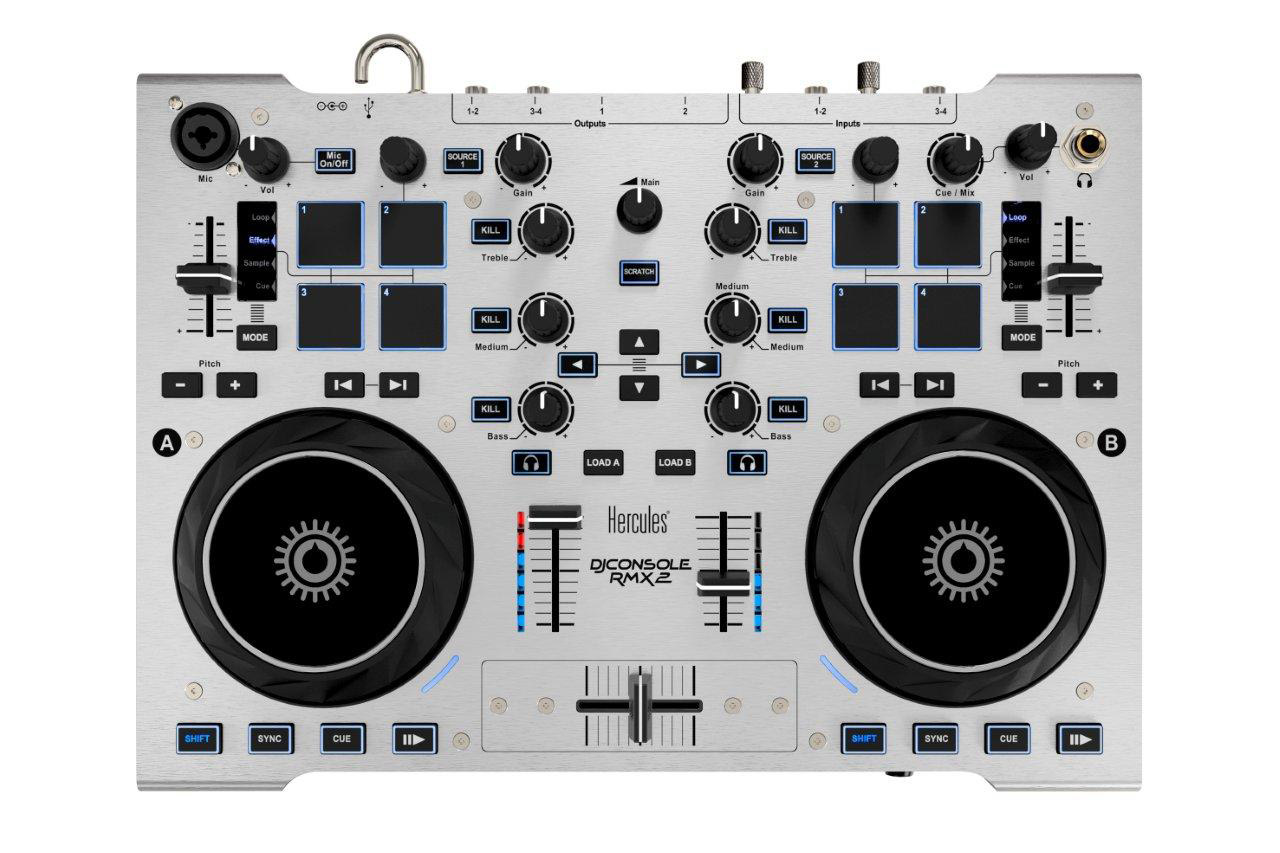
Hercules DJConsole RMX 2 Digital DJ Controller

Hercules DJConsole RMX 2 Digital DJ Controller


High resolution DJ controller

High-resolution audio: 96KHz/24-bit
High-resolution faders: 14-bit MIDI mode

Outstanding audio quality

Sampling up to 96KHz/24-bit
XLR balanced main output (1-2)
XLR balanced microphone input

2-deck DJ controller

2 jog-wheels with pressure detection
8 velocity pads
High resolution controls: 14-bit MIDI mode on all faders

Metal frame

Brushed aluminium top panel
Steel basis

Secure

Rugged casing supporting any kind of mix
Hook protecting the USB connector from unexpected removal
Changeable cross-fader compatible (Mini-Innofader® compatible)
Power adapter protecting the audio from USB power fluctuations

Designed for mobile DeeJays

Transport bag included
All-in-one design: controller + audio
Rugged metal enclosure for transport conditions
Light and compact enough to be carried on the shoulder
Included DJ software: Virtual DJ 8 and DjucedTM40°

Technical specifications

DJ Audio Interface

High Resolution Audio

96KHz / 24-bit in Windows (ASIO) & Mac (Core Audio)
Supports lower sampling rates (44.1 / 48 / 88.2 KHz)

Outputs
Output channels 1-2
2 balanced XLR = Master out

Strong level, for public address amplifiers
Balanced output = music protected from interferences in cables

2 RCA = Booth out

Use = for monitor speakers, close from the DeeJay

Output channels 3-4

2 stereo ¼" jack headphones outputs
2 RCA output (to connect to an external mixer)

Inputs
4-channel input in RCA, to mix 2 external sources

Line/Phono switches: for line or phono sources
Level setting (software): standard (line), boost (CDJ players)

Microphone input: XLR/Jack combo plug, balanced

Balanced input, for the best sound with high-end microphones
Also support consumer unbalanced microphones
Talk-over the mix

DJ Control Surface

2-deck DJ Controller

36 transport buttons
12 rotary potentiometers
8 velocity sensitive pads
5 faders
2 rotary encoders
2 jog wheels with pressure detection

Transport buttons
DJConsole Rmx2 transport buttons are made of:

A tactile switch with a short travel and a detent,
A rubber cap with a smooth contact, and 22 buttons include an inner backlight showing the status.

Rotary potentiometers

2 potentiometers (microphone and headphones volume) set an analogue volume (setting headphones & mic preamplifiers).
10 other rotary potentiometers send an extended MIDI control (14-bit MIDI mode, compatible with standard 7-bit MIDI control).
All rotary potentiometers have a rubber cap.

Velocity sensitive pads

Each deck has 2 sets of 4 pads, with 4 modes per pad (Loop, Effect, Sample, Cue), providing 16 controls per deck.
As pads are velocity sensitive, they can send progressive commands (for example set the volume of a sample).
All pads include a backlight.

Faders

5 faders send an extended MIDI control (14-bit MIDI mode, compatible with standard 7-bit MIDI control).
The volume and pitch faders have a rubber pad.
The pitch fader has a centre detent.
The cross-fader is removable (its slot fits with a Mini-Innofader®).

Encoders

The encoders can modulate the effects sent via the pads.
The encoders have a rubber pad.

Jog- wheels

The jog wheels use a pressure detection to set the scratch on/off.
A side LED shows the status of the pressure detection.

Box contents

Hercules DJConsole Rmx2
USB cable, transport bag, power adapter
CD with PC/Mac DJ software
Printed installation guide + online manual

Minimum configuration

Computer CPU: 1.5 GHz or faster CoreTM 2 Duo or AMD 64-bit
2 GB of RAM or more
Powered USB port
100 MB available disk space
CD/DVD-ROM drive
Internet access
Amplified stereo speakers and headphones

Operating system (32/64-bit)
MS Windows® XP/Vista/7/8 or
Mac OS® 10.6,10.7, 10.8 (Core Duo)

Tuesday, July 17, 2012

Hercules DJControl Instinct Digital DJ Controller

Hercules DJControl Instinct Digital DJ Controller


2-deck DJ controller
2 jog wheels with pressure detection
Mixer controls in center, deck controls on left and right sides
Built-in audio outputs for mix and previewing
Mix: 2 RCA outputs + 1/8" stereo mini-jack output for active speakers
Preview: 1/8" stereo mini-jack output for headphones
Pressure-detecting jog wheels
Scratch by pressing down on the wheel, as naturally as with a vinyl record
The wheels also bend the pitch and browse within tracks
Compact and user-friendly
Compact: 10.4 x 7.4" = 26.5 x 18.7 cm
USB bus-powered (attached USB cable => can’t lose the cable)
Weight: < 2.2 lbs / 1 kg

Technical specifications

DJUCEDTM DJ software

Function-rich software for both beginners and advanced DJs

User-friendly

Get started mixing in just minutes: the controller and the software fit perfectly together
Instantly view the beats, track lengths, and which songs fit well for the next track to be played

Rewarding

Set the pitch intuitively or sync automatically for smooth transitions
Customize your songs with loops, effects and samples

Creative

Create your own sound with filters or the step sequencer
Save your mix in audio files you can share with your friends

DJ control surface

Born to mix

Intuitive

The mixer and deck areas are clearly differentiated
The structure has the look and feel of 2 DJ CD players and a mixer

Powerful

Scratch tracks with no latency on pressure-detecting jog wheels
Tweak your songs with hot cue, samples, loops and effects keys

Stylish

Gorgeous design: glossy decks, brushed mixer, rubber on caps
Orange backlights show the status of the controls

DJ audio interface

Mix and previewing outputs

Play the mix on the rear panel outputs

2 formats for the mix: 2 RCA and a 1/8" stereo mini-jack output
Powerful enough for both hi-fi systems and PA system speakers
Since both output formats play simultaneously, you can connect the RCA outputs to a PA system and the 1/8" mini-jack to DJ booth speakers

Preview output on front panel

1/8" stereo mini-jack output for headphones
Headphone controls on the controller: cue select and volume
Compatible with headphones from 32 to 600 ohms

Box contents

Hercules DJControl Instinct
Installation CD-ROM (PC/Mac) with PC/Mac DJ software
Paper quick guide + online manual

Minimum configuration

Computer CPU: 1.5 GHz or faster
1 GB RAM or more (2 GB in 64-bit OS)
Powered USB port
100 MB available hard disk space
CD/DVD-ROM drive
Internet access
Amplified stereo speakers and headphones

Operating system (32/64-bit)

MS Windows® XP/Vista/7/8 or
Mac OS® 10.6/10.7/10.8 (Core Duo)

Drivers

Mac OS®

MIDI for controls
Core Audio for audio playback

Windows®

MIDI for controls
WDM and ASIO for audio playback

Sampling rate: 16-bit / 44.1 kHz stereo

Technology

DJ
Abbreviation of Disc Jockey: a person who selects and plays music at a party.
DJ deck
Originally, a deck was a turntable, referred to as a vinyl turntable, used by DJs to play music. Today, DJs use the term deck to refer to any music player, CD player or MP3 player equipped with a wheel to advance/rewind within a piece as with a vinyl turntable. A dual-deck device is a device with two wheels which control playback of two different pieces of music.
Mixing board
Device to which a variety of sound sources can be connected and mixed together: the mix is adjusted using a cross later, volume faders and several EQ knobs.
Jog wheel
In DJing, a jog wheel is a wheel simulating the function of a turntable (also called a vinyl deck), and can be used to control playback of a CD, DVD, MP3 player or computer. A jog wheel is used to navigate within a piece, to speed up or slow down to the music or to produce sound effects such as scratching (the sound made by a microgroove record on a turntable when the record is quickly pushed forward or pulled back by hand). The Hercules DJ Console, DJ Control and Mobile DJ all include jog wheels.
Loop
A loop consists of selecting a start and end point for a repeated section in a musical piece and then playing back this looped section as many times as desired. Sections looped in a musical piece are often the sections best for dancing.

Wednesday, May 16, 2012

Hercules HDP DJ-Pro M100.1 Professional DJ Headphones

Hercules HDP DJ-Pro M100.1 Professional DJ Headphones Description The Hercules HDP DJ-Pro M100.1 Professional DJ Headphones are tailored for analytic listening: great for DJ monitoring, studio and production. They feature soft, large ear pads to shield the user's ears from ambient noise and closed-back ear-cups to prevent sound from bleeding out. The cable connection adapts to either the left or right ear-cup accommodating both right and left-handed DJs. The swivel housings make for convenient use - Easy 1-ear monitoring; Easy folding and mobility; and the extending arms accommodate both large and small heads. The 50 mm diameter drivers offer clear playback and deep bass response response. Their high efficiency (107 dB at 1 mW sensitivity) provides enough decibels to preview your mix even close to PA speakers. Rounding out their specifications are an ultra-wide frequency response of 5Hz-30kHz and 32 ohm impedance. These professional headphones are backed by a 2-year warranty and designed to offer years of trouble-free Djing enjoyment.

Hercules Advanced Pro DJ Headphones - HDP DJ-ADV G50.1

Hercules Advanced Pro DJ Headphones - HDP DJ-ADV G50.1
Description Sporting a shape similar to the professional HDP DJ-Pro M100.1 version, the HDP DJ-Adv G50.1 model is distinguished by its black lacquer finish and green highlighting elements. 3-Axis Rotation: This mechanism also allows for the headphones to be folded and easily transported in a carry bag. Their cable, which measures 6' in length when extended, can be connected to the left ear-cup for right-handed DJs, or to the right ear-cup for left-handed users. comes with 1/8" to 1/4" plug adapter, coiled connection cable. The Hercules HDP DJ-Adv G50.1 Advanced DJ Headphones are tailored for analytic listening: great for DJ monitoring, studio and production. They feature large ear pads to shield the user's ears from ambient noise and closed-back ear-cups to prevent sound from bleeding out. . These advanced headphones are backed by a 2-year warranty and are designed to offer years of trouble-free Djing enjoyment. Features: 32 ohm drivers: low enough impedance for strong output volume on DJ gear, computers and mobile audio players Effective passive noise cancelling; Soft, large ear pads: isolate the DJ's ears from ambient noise; Closed-back ear-cups prevent sound from bleeding out 50 mm diameter drivers: clear playback for deep bass response; 10Hz-25kHz: wide frequency bandwidth, to monitor any audible frequency; 102 dB at 1 mW sensitivity: enough decibels to preview even close to PA speakers Swivel housing for any use and any DJ; Easy 1-ear monitoring; Easy folding and mobility; Extending arms for both large and small heads

Hercules HDP M40.1 Pro DJ Headphones

Hercules HDP M40.1 Pro DJ Headphones Versatile DJ headphones for DJing and leisure use
The HDP DJ M 40.1 from Hercules have 50mm drivers and a fully flexible design, making them ideal for DJs who need to monitor music through one ear cup only. The closed cup, circum-aural design of the earcups provide superior comfort even after hours of use and block out ambient noise. Colour: Black Headband Width: 30mm Frequency Range: 20-20000Hz Impedance (Ohm): 60 Sensitivity (dB/mW): 96 Driver Unit: 50mm Closed/Open Back: Closed back Plug Type: 3.5mm stereo mini-jack plug Cord Length: 2m Folding Design: Foldable Accessories: 6.35mm stereo jack adapter

Friday, November 18, 2011

Hercules DJ Control AIR Digital DJ Controller [ December 2011 ]


Hercules DJ Control AIR Digital DJ Controller [ December 2011 ]

2-deck DJ controller
2 jog wheels with pressure detection
Velocity sensitive pads
Air control: 1 contactless control

Pressure-detecting jog wheels
Scratch by pressing on the jog wheels, as naturally as with a vinyl record
Jog wheels also control pitch bend and browsing within tracks

8 pads with velocity detection
The pads control the sampler, loops and effects
The inner backlight shows the pads’ activation
Pads can be set as binary On/Off controls, or gradual controls

Air control: a contactless sensor lets you control the mix from above, without even touching the device
DJ Control Air converts the distance to your hand into a MIDI command
No need to touch the controller: one command of the mix without any physical contact
Compatible with all light conditions

Built-in audio outputs for mixing and previewing tracks
1/8" (3.5 mm) stereo mini-jack output for the mix
1/4" (6.35 mm) stereo jack output for previewing track

TECHNICAL SPECIFICATIONS

Air control

Why is the controller called DJ Control Air?

Air stands for Adjustment by InfraRed: it is a contactless control.
The DJ places his or her hand flat over the infrared beam.
The controller calculates the distance between the sensor and the hand, and converts it into a gradual MIDI command.
This MIDI command modulates a setting in the DJ software.

Does Air control require specific light conditions?

No, Air control functions under any light conditions.
The infrared light beam projected towards the hand is invisible.
The sensor captures the infrared reflection on the hand, and uses the reflection to calculate the hand’s distance.
The reflection is the same in both daylight and low light conditions, allowing Air control to be used during the day, at night or in places with weak lighting.
Air control functions with all flesh tones. The only incompatibility is the use of black gloves (as the infrared sensor would not be able to detect the reflection).

8 pads

2 sets of 4 pads control loops, sampler and effects commands.
The DJ taps on the pads with his or her fingertips to send commands such as looping, sampler or effects.
The pads light up when touched.
In addition to a binary On/Off command, each pad can transfer velocity information to modulate the command.
For example: in sampler mode, the velocity can control the volume of a sample’s playback. The playback volume depends on how soft or how hard the DJ taps on the pad.

Pressure-detecting jog wheels

The jog wheels detect the pressure from the user’s hand.
With scratch mode enabled, the jog wheels scratch when the hand’s weight is detected, and stop scratching when the hand’s weight is no longer detected. This allows the DJ to:

stop playback by pressing on the jog wheel.
restart playback by lifting up his or her hand.
scratch by turning the jog wheel while pressing down, and stop scratching by lifting up his or her hand.
bend the pitch (if playback is on) / browse within tracks (if playback is off) by turning the jog wheels using their outer ring, to avoid applying downward pressure.
With scratch mode disabled, the jog wheels bend the pitch or browse within tracks when the jog wheels are turned, regardless of the pressure applied.

Built-in audio

1/8" (3.5 mm) stereo output for the mix
1/4" (6.35 mm) stereo output for headphone previewing

DJUCEDTM DJ software

Intuitive, powerful software
Mix 2 audio tracks on the fly
Save your mix as an audio file

Mechanical specifications

Casing: 13.78 x 8.66 x 1.18 "
35 x 22 x 3 cm
Jog wheels: 3.94 " / 10 cm diameter
Weight: 3.1 lbs / 1.4 kg
USB cable: Attached

BOX CONTENTS

Hercules DJ Control Air
Installation CD-ROM (PC/Mac) with PC/Mac DJ software
Printed installation guide + online manual

MINIMUM CONFIGURATION

Computer with 1.5 GHz CPU or faster
1 GB RAM or more
Powered USB port
100 MB available hard disk space
CD/DVD-ROM drive
Internet access
Amplified stereo speakers and headphones
Operating System (32-bit / 64-bit)
Microsoft Windows® XP, Vista or 7
or Mac OS 10.5, 10.6 or 10.7 on Core Duo Mac

Thursday, January 27, 2011

Hercules DJ 4Set [ April/May 2011 New ]


Hercules DJ 4Set [ April/May 2011 New ]

* All-Nighters Only
* Large DJ controller with built-in audio outputs

Description

The Hercules DJ 4Set combines the functions and feel of a pro controller with the simplicity users need to host memorable parties all night long.

Technical specifications

* Built-in audio
o 4-channel output: stereo line output for the mix, stereo headphone output for previewing tracks
o Microphone input: input with talk-over function
o No need to carry an audio interface

* Large DJ controller
o Same size as DJ Console Rmx: 35x25cm (13.7x9.8")
o Large for mixing, compact enough for mobile use
o Lightweight: < 2 kg/4.4 lbs
o USB bus-powered: no need for a power plug

* Jog wheels
o Touch detection activated by weight of user’s hand
o Large: 12cm (4.7") diameter/1.5cm (0.6") height

* 2- & 4-deck control (A/B/C/D)
* 2-deck controls + 2 deck switches convert deck A into C, and deck B into D => control 4 virtual decks
* Deck switches convert all deck controls into another set of MIDI commands, + mixer volume and EQ controls
* Deck viewers: lights up the letter of the controlled deck
* Backlighting color of jog wheels changes, to indicate which virtual deck is being controlled

* User-friendly
o Comfortable mixing
o Well-spaced controls
o Large, non-slip feet

* Software included
o VirtualDJ 7 LE DJC

Box contents

* USB bus-powered controller
* 2 decks + mixer controls
* 4-channel out (stereo out for mix + stereo out for preview) / 1-channel in (microphone)
* Drivers
o MIDI control in Mac OS/Windows
o Audio drivers:
+ Core Audio® (Mac OS)
+ WDM/ASIO (Windows)

Minimum configuration

* Computer with:
o 1GB RAM
o CD- or DVD-ROM drive
o Powered USB port
o 100MB hard drive space
o Internet access (for software or driver updates)

* For Windows XP/Vista/7 (32- & 64-bit):
o 1.5GHz CPU (Atom®, Core Duo®, Athlon®)

* For Mac OS® 10.5/10.6 (32-bit):
o 1.5GHz Core Duo® CPU